2. Transforming deeply nested JSON from APIs into Pandas DataFrame
Flatten deeply nested JSON from a financial API into a Pandas DataFrame using pd.json_normalize and the explode method.
In one of the past workshops we did for Bank Rakyat Indonesia (BBRI), we provided a clean dataset that participants use to construct their analysis on. This article expands on how we transformed the raw JSON data from the API into a Pandas DataFrame.
For context, here is how the data looks like in tabular form:
symbol,company_name,year,pe,pb,ps
BBRI.JK,PT Bank Rakyat Indonesia (Persero) Tbk,2020,27.296475059198,2.24404134373024,3.90812024342799
BBRI.JK,PT Bank Rakyat Indonesia (Persero) Tbk,2021,19.8501979232225,2.13579246128274,4.02599153256836
BBRI.JK,PT Bank Rakyat Indonesia (Persero) Tbk,2022,14.4852351105461,2.47654136988394,4.40613876244184
BBRI.JK,PT Bank Rakyat Indonesia (Persero) Tbk,2023,14.3700683214413,2.77373225214342,5.18776985111159
BBRI.JK,PT Bank Rakyat Indonesia (Persero) Tbk,2024,11.8598506535486,2.42373070867358,3.96923623135049
BMRI.JK,PT Bank Mandiri (Persero) Tbk,2020,17.3942521554938,1.54302128039226,3.05224667300517
BMRI.JK,PT Bank Mandiri (Persero) Tbk,2021,11.5796062923157,1.58561909266445,2.91227616355148
BMRI.JK,PT Bank Mandiri (Persero) Tbk,2022,11.1374278712277,1.99641859827664,3.62397928851202
BMRI.JK,PT Bank Mandiri (Persero) Tbk,2023,11.6603200287564,2.46122688658584,5.20968178447345
...
By comparing the historical P/E ratios of different banks to their peers and their own historical averages, an analyst can get a sense of whether a bank is trading at a premium or discount to its intrinsic value, and whether it is a good value investment relative to its historical norm.
The data, of course, is sourced from Sectors Financial Data API, which is a product incubated by Supertype and powering thousands of financial workflows for the leading financial institutions in Indonesia. In the following sections, we will walk through the process of transforming the raw JSON data from the API into a Pandas DataFrame.
requests on a Financial API endpoint
import os
import requests
from dotenv import load_dotenv

load_dotenv()

SECTORS_API_KEY = os.getenv("SECTORS_API_KEY")

headers = {"Authorization": SECTORS_API_KEY}

def fetch_data(url):
    """
    Fetches the data from the specified URL and returns it as a JSON object.
    We created this from the get_info function in the previous chapter (API programming)
    """
    try:
        response = requests.get(url, headers=headers)
        response.raise_for_status()  # Raise an exception for HTTP errors
        return response.json()
    except Exception as e:
        print(f"An error occurred: {e}")
        return {"error": "An error occurred while fetching the data."}
To actually use fetch_data we need to specify a url. This can be constructed from
reading the correponding API documentation. For example, to fetch the historical P/E ratios of BBRI, one could do:
import os
import requests
from dotenv import load_dotenv
import pandas as pd

load_dotenv()

SECTORS_API_KEY = os.getenv("SECTORS_API_KEY")

headers = {"Authorization": SECTORS_API_KEY}

banks = ["BBRI", "BMRI", "BBCA", "BBNI", "BRIS"]
base_url = "https://api.sectors.app/v1/company/report/"


def fetch_data(url):
    """
    Fetches the data from the specified URL and returns it as a JSON object.
    We created this from the get_info function in the previous chapter (API programming)
    """
    try:
        response = requests.get(url, headers=headers)
        response.raise_for_status()  # Raise an exception for HTTP errors
        return response.json()
    except Exception as e:
        print(f"An error occurred: {e}")
        return {"error": "An error occurred while fetching the data."}

def get_bbri_as_dataframe():
    """
    Fetches the historical P/E ratios of BBRI and returns it as a DataFrame
    """
    url = f"{base_url}BBRI/?sections=valuation"
    # formed url is: https://api.sectors.app/v1/company/report/BBRI/?sections=valuation
    response = fetch_data(url)

    return pd.json_normalize(response['valuation']).T


bbri = get_bbri_as_dataframe()
pd.json_normalize and explode method
The one line that you should pay attention to from the section above is pd.json_normalize(response['valuation']).T.
This line of code is responsible for transforming the deeply nested JSON data into a Pandas DataFrame, and then transposing it.
If we were to print bbri, we would get the following output:
print(bbri)

Output:                                                                0
last_close_price                                                    4530
latest_close_date                                             2024-08-05
daily_close_change                                             -0.038217
forward_pe                                                     10.036112
price_cash_flow                                                 5.830954
enterprise_to_revenue                                               None
enterprise_to_ebitda                                                 0.0
peg_ratio                                                       0.353977
intrinsic_value                                              5389.036722
historical_valuation   [{'pb': 2.24404134373024, 'pe': 27.29647505919...}]
An interesting observation here is that with the json_normalize function, each key in the JSON object is
flattened into a column in the DataFrame, but the historical_valuation key is still a list of dictionaries.
To "explode out" the list of dictionaires into separate, individual columns, we can use the explode method in Pandas.
Let's see how .explode() works in action:
bbri.loc['historical_valuation'].explode().head()

# Output:
# 0    {'pb': 2.24404134373024, 'pe': 27.296475059198...}
# 0    {'pb': 2.13579246128274, 'pe': 19.850197923222...}
# 0    {'pb': 2.47654136988394, 'pe': 14.485235110546...}
# 0    {'pb': 2.77373225214342, 'pe': 14.370068321441...}
# 0    {'pb': 2.33110392317047, 'pe': 11.406607296663...}
# Name: historical_valuation, dtype: object
Notice that each of the nested dictionaries in the historical_valuation column has been exploded out -- this is the
essence of the explode method in Pandas, and when we combine it with json_normalize, we can transform even deeply nested
JSON data into a Pandas DataFrame:
pd.json_normalize(bbri.loc['historical_valuation'].explode())

# Output:
#          pb         pe        ps  year  pb_peer_avg  pe_peer_avg  ps_peer_avg
# 0  2.244041  27.296475  3.908120  2020     1.262425    27.296475     6.378919
# 1  2.135792  19.850198  4.025992  2021     1.466306    15.014559     6.374056
# 2  2.476541  14.485235  4.406139  2022     1.008524    15.129255     4.343578
# 3  2.773732  14.370068  5.187770  2023     0.832330    14.072334     3.899448
# 4  2.331104  11.406607  3.817545  2024     0.781849    13.367830     3.457184
Putting it all together
As a quick recap, whenever an API service (like the one from Sectors Financial API) returns deeply nested JSON data, you can call on these two tools in Pandas to transform it into a flattened, tabular DataFrame:
json_normalizeto flatten the JSON data into a DataFrameexplodeto expand out lists of dictionaries into separate into columns
To arrive at the full code used for the workshop at BBRI, one would just have to perform the above iteratively
for each bank in a defined banks list before concatenating them into a single DataFrame.
banks = ["BBRI", "BMRI", "BBCA", "BBNI", "BRIS"]


def create_df(banks, save_to_csv=False, file_name="indonesia_banks.csv"):
    """
    Creates a DataFrame by fetching data from the API for each bank in the list.

    Parameters:
    - banks: List of bank identifiers.
    - save_to_csv: Boolean flag to indicate if the DataFrame should be saved to a CSV file.
    - csv_file_name: Name of the CSV file to save the DataFrame (default is "data.csv").

    Returns:
    - DataFrame with valuation data from banks of Indonesia
    """
    df_list = []

    for bank in banks:
        url = f"{base_url}{bank}/?sections=valuation"
        response = fetch_data(url)

        if "error" not in response:
            df = pd.json_normalize(response)
            if "valuation.historical_valuation" in df.columns:
                historical_df = pd.json_normalize(
                    df["valuation.historical_valuation"].explode()
                )
                historical_df["symbol"] = df["symbol"][0]
                historical_df["company_name"] = df["company_name"][0]
                historical_df = historical_df[
                    ["symbol", "company_name", "year", "pe", "pb", "ps"]
                ]
            df_list.append(historical_df)
        else:
            print(f"Error fetching data for {bank}")

    if not df_list:
        joined = pd.DataFrame()
    else:
        joined = pd.concat(df_list, ignore_index=True)

    if save_to_csv:
        joined.to_csv(file_name, index=False)
        print(f"Data saved to {file_name}")
    return joined


df = create_df(banks, save_to_csv=True, file_name="datasets/indonesia_banks_050824.csv")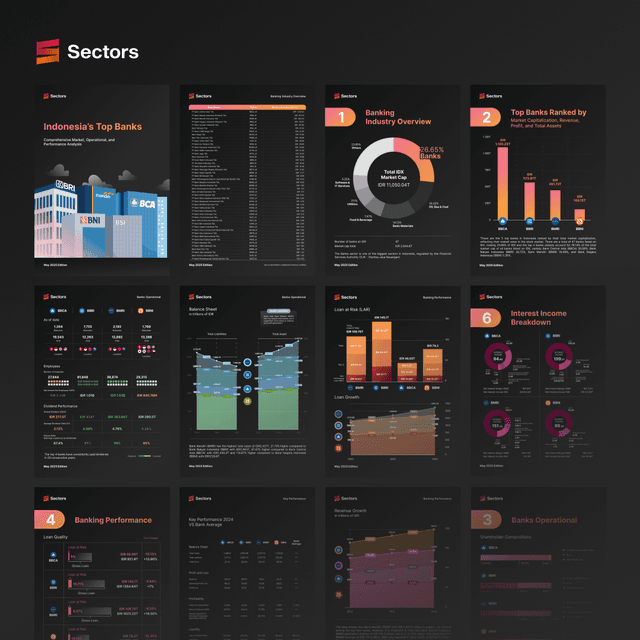
Like this piece? Take home Sectors Snapshot: Indonesia Banks (May '25).
We packed the full picture into this report by Evelyn Ong, with the numbers, charts, and context laid out end to end.
Claude for Market Analysis
A hands-on workshop for building a personal market-monitoring system with Claude: screen IDX and SGX stocks, set up alerts in plain English, and build a live dashboard with an analyst built in. Beginner-friendly.
October 28, 2026Zoom Conferencing (Online)
Keep reading
1. API Programming with Python
Everything to get you started with creating programs using Financial APIs in Python.
Data Science in Industry
Data Science for Digital Advertising
How I use data analytics to deliver value to my advertising clients; A case study on creative decay analysis, retention rate analysis, and exploratory data analysis (python code provided)
Data Engineering
Django REST + custom permissions + Talend API / Postman = ❤️
Django REST Framework + testing your custom permissions in an API application with Talend API Tester or Postman
Field notes, straight to your inbox
We publish what we learn building analytics and AI systems for some of the largest enterprises in the region. Subscribe and we will send the next one your way.